Weather Radar
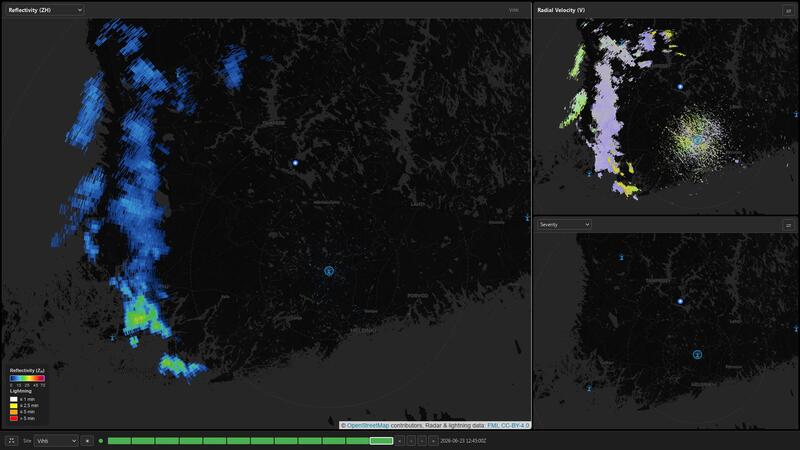
Our radar page brings together live data from all 12 weather radars of the Finnish Meteorological Institute (FMI). You can browse through the latest scans, switch between different radar products, and compare two views side by side.
Getting started
Pick a radar site from the dropdown at the bottom to see the latest velocity scan. Click and drag on the map to pan, scroll to zoom. The timeline at the bottom lets you step back through recent scans — use the arrow buttons or drag the slider.
The main view shows radial velocity by default. The smaller panel on the right shows reflectivity. You can swap them with the ⇄ button, or use the dropdown to pick a different product for either panel.
Products
Radial Velocity (V)
Velocity shows how fast precipitation is moving toward or away from the radar. Green-to-blue means motion toward the radar, yellow-to-red means away. Gray means near-zero velocity (crosswind).
This is your primary tool for spotting rotation in storms. A tight couplet of green next to red — especially if it persists across several scans — indicates a mesocyclone and potential tornado threat. Strong inbound/outbound couplets along a line suggest damaging straight-line winds.
The scale goes from −32 to +32 m/s. Values above the radar’s unambiguous range (typically around 7–8 m/s on single-PRF scans) may appear folded — you’ll see them wrapped around to the other side of the scale. Dual-PRF scans have a much higher range (~32 m/s) and show the full picture.
Reflectivity (ZH)
Reflectivity is the classic radar view — it shows where rain and hail are and how intense they are. The scale goes from dark blue (light rain) through green, yellow, orange, and red to magenta (extreme precipitation).
Use reflectivity to locate thunderstorms, identify heavy rain cores, and estimate hail potential. Magenta cores (60+ dBZ) often contain large hail, especially when they’re elevated or have a distinct shape.
Differential Reflectivity (ZDR)
ZDR tells you about the shape of precipitation particles. Raindrops are oblate (flattened) as they fall, so they return stronger horizontal than vertical signals, giving positive ZDR. Hail tumbles and is more spherical, giving ZDR near zero or even slightly negative.
Purple shades indicate negative ZDR — a sign of tumbling hail. Blue-to-green indicates typical raindrops. Yellow-to-red means large or highly oblate drops, often found in the inflow region of a supercell where strong updrafts sort particles by size.
A ZDR column — a vertical tower of enhanced values — can mark the location of the main updraft.
Specific Differential Phase (KDP)
KDP measures how much the radar signal is slowed down by liquid water along the path. It’s great at cutting through hail contamination — unlike reflectivity, which gets confused by large hailstones, KDP stays sensitive to the liquid water content underneath.
Dark blue means little liquid water. Greens and yellows indicate moderate rain. Orange-to-red suggests heavy rain, and magenta points to extreme liquid water content — often associated with flooding potential or hail cores wrapped in water.
The scale goes from 0 to 2 °/km. Values above 1 °/km usually indicate very heavy rain.
Correlation Coefficient (ρHV)
RhoHV measures how similar the horizontal and vertical radar signals are. “Pure” precipitation like rain gives values close to 1.0 (blue). Mixed-phase precipitation, hail, or debris gives lower values (yellow to red).
This is your best tool for distinguishing meteorological from non-meteorological targets. A region of low rhoHV (red/orange) collocated with a reflectivity echo could mean hail, while the same signature outside precipitation suggests insects, birds, or chaff.
During tornado events, a rhoHV “debris ball” — a small area of very low values (red) surrounded by higher values — confirms debris lofted by the tornado.
Velocity Shear Proxy
Shear is a derived product that highlights areas where the radial velocity changes rapidly over short distances — a signature of rotation. It’s computed by running a Sobel edge-detection filter on the gridded velocity field, then masked with reflectivity above 20 dBZ to suppress clear-air noise.
The palette runs from transparent (no gradient) through dark purple, blue, teal, yellow, orange, red, and magenta (extreme gradient). A mesocyclone appears as a compact orange-to-magenta blob, typically 5–15 km across, often at the edge of a reflectivity core. The background shear field shows diffuse blue/teal areas where the wind varies gradually.
This is a lightweight proxy computed directly from the gridded velocity — no separate polar-coordinate processing needed. At Finland’s latitude (~60°N), the Mercator projection stretches the image about 2×, so the absolute values differ from operational azimuthal shear products, but relative hotspots correctly flag rotation.
Shear & Debris Alerts
Alerts are automated detections that appear as circles on the map and as a blinking badge in the panel header.
Shear alerts (orange dashed circle) — triggered wherever the shear proxy exceeds 60 (on a 0–100 scale) over a large enough area. This flags spots where the velocity changes unusually fast over a short distance. That often means rotation, but it can also light up along gust fronts or wind-shift boundaries where there’s no storm rotation at all. Treat it as “something worth zooming into,” not confirmed rotation.
Debris alerts (magenta solid circle) — triggered where three things happen at the same pixel:
- Shear is active nearby (within 8 km)
- Correlation coefficient (ρHV) drops below 0.70
- Reflectivity exceeds 40 dBZ
That combination — rotation + low correlation + heavy precip — is the signature of debris being lofted by a tornado. These are rare and should be taken seriously. If you see a magenta circle, that’s where you want to be looking, right now.
Both alert types are automatically sized to match the detected feature’s area, so bigger detections get larger circles.
Timeline sync: Alerts only show when the selected timestamp on the timeline matches the radar scan that generated them (within ±3 minutes). If you scroll back through older scans and the alerts disappear, that’s normal — no new detections existed at that time.
Caveats: The shear alert algorithm is a lightweight gradient check, not a proper mesocyclone detector. It does not look for velocity couplets (inbound next to outbound), so it will occasionally flag strong linear wind shear or noisy data. Debris alerts are more reliable because they require three independent signatures, but they depend on the correlation coefficient being clean — ground clutter or interference can cause false drops in ρHV that look like debris.
A note on Korppoo
Korppoo is located in the archipelago and occasionally shows radial streaks in reflectivity and dual-pol products, most often around the 10 o’clock position. This is interference from marine radar on ships — not actual weather. FMI’s own display shows the same artifact.
Cross-station echo alignment
When comparing the same product from different radar sites (for example, by changing the site dropdown), you may notice that precipitation echoes don’t overlap perfectly between stations. This is expected and has nothing to do with positioning accuracy — the station icons are exactly where they should be.
The reasons are physical:
- Beam height: A 0.7° elevation sweep at 150 km range puts the beam center at roughly 1.8 km altitude. Two radars viewing the same precipitation from opposite sides see completely different slices through the storm.
- Vertical structure: Rain, hail, and snow are rarely uniform with height. A bright band, a hail core, or a melting layer will look very different depending on which altitude each radar sees.
- Scan timing: Each radar completes a volume scan on its own schedule. By the time you switch sites, the weather may have moved or evolved.
- Azimuth sampling: Each station has its own ray spacing and elevation angles, so the same geographic point is sampled at slightly different positions within each radar’s beam pattern.
This parallax is inherent to single-radar views. The composite overlay blends all 12 stations to give a more complete picture.
Example: a supercell thunderstorm
Radar data is collected in rays — think of them as spokes on a wheel. Each scan has 360 rays at 0.5° spacing, and along each ray the signal is sampled in range bins at 250 m intervals. This gives the data its characteristic blocky, wedge-shaped look: you can often see individual rays, especially at longer ranges where the beam has spread. That’s normal radar geometry, not a display glitch.
The images below are synthetic — generated to match FMI’s resolution and color palette — but show the same features you’d see on the live page.
Products side by side
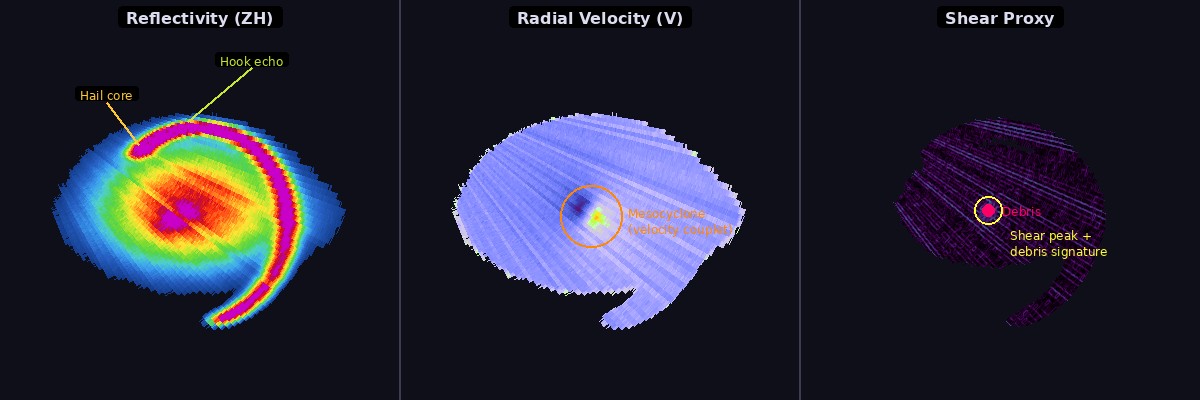
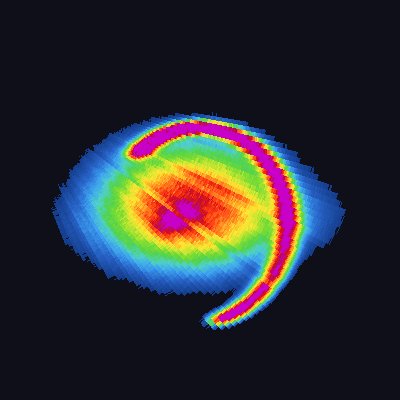
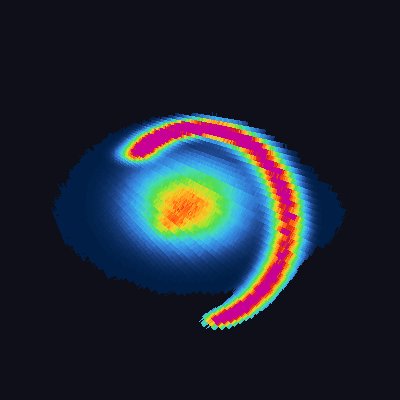
Reflectivity (left) shows where the heaviest precipitation is. The bright magenta-orange blob near the center is the hail core — 60+ dBZ, often with large hail. The thin curved arm wrapping around the bottom is a hook echo, the classic radar signature of a rotating supercell. Rain wrapping around the forward side (left) is the forward-flank downdraft.
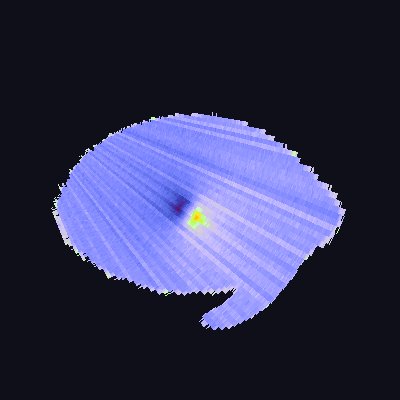
Radial velocity (center) shows motion toward (green/blue) and away (yellow/red) from the radar. The tight green-red couplet at the hook echo location is the mesocyclone — the storm’s rotating updraft. Where green meets red over a short distance, the wind is changing direction rapidly, which means rotation.
Shear (right) highlights those rapid velocity changes. The bright yellow blob at the center is the mesocyclone shear signature — the same rotation visible as the velocity couplet in the middle panel. The debris ball is not directly visible in shear (it’s a ρHV signature), but the alerts system detects it by checking for low correlation + high reflectivity at the shear peak location. A tornado is always within the mesocyclone, so the shear hotspot is exactly where to look for debris. The diffuse teal-blue background shows gradual wind shifts, not rotation.
Individual products
Each product reveals different parts of the storm:
| Product | What to look for |
|---|---|
| Reflectivity (ZH) | Hook echo wrapping into the core. Hail core (magenta/orange) offset within the storm. Thin gust front arc ahead of the storm (bottom). |
| Velocity (V) | Green-red couplet at the mesocyclone. Note how individual rays are visible — each spoke is one radar beam. Velocity values jump between adjacent beams where the wind varies. |
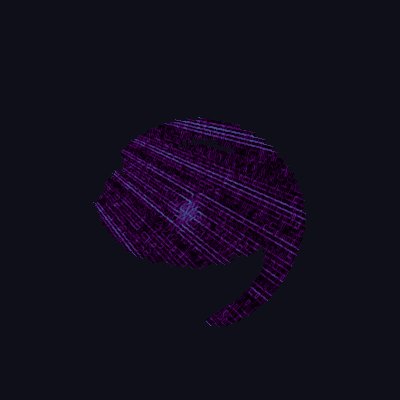
| Differential Refractivity (ZDR) | Hail core shows near-zero or purple (negative) values — hail tumbles and looks round to the radar. The ZDR column (yellow area above the core) marks the updraft. Debris area shows moderate positive values. |
| Specific Diff. Phase (KDP) | Heavy rain in the core lights up in orange/red. KDP cuts through hail better than reflectivity — note how the hail core doesn’t dominate the signal here. |
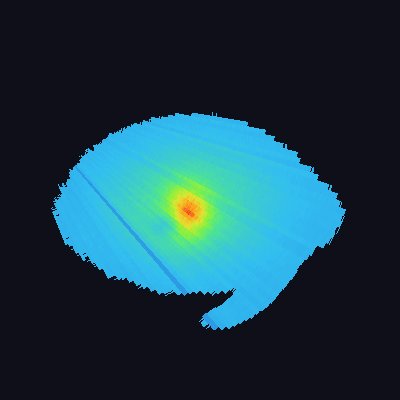
| Correlation Coeff. (ρHV) | Most rain is deep blue (close to 1.0). The hail core shows as a green/yellow dip. The debris ball at the mesocyclone center appears as a red/orange spot — values below 0.70 mean non-meteorological targets (debris). |
| Shear | The mesocyclone lights up bright yellow. Compare with the velocity couplet — any place where the shear product shows a compact bright spot is worth zooming into. |
Gust front context
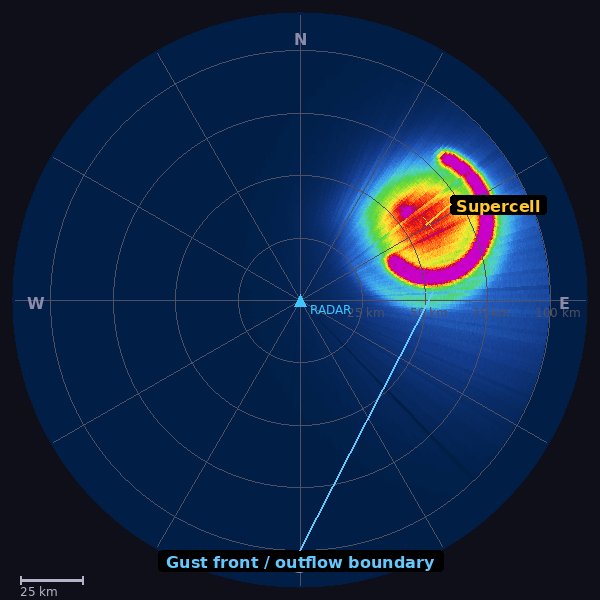
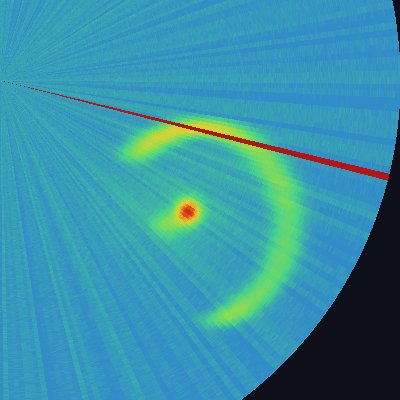
A wider view of the same storm shows the gust front — the arc of light reflectivity (20–25 dBZ) pushing out ahead of the storm. This is where the cold outflow from the downdraft meets warm inflow air, often triggering new storms. On velocity, the gust front shows as a convergence line (green on one side, red on the other). The shear product sometimes lights up along these boundaries, which is why a shear alert alone doesn’t always mean rotation.
Why synthetic data?
These examples use synthetic data because real storms don’t stand still for screenshots. The features are exaggerated slightly to make them easy to recognize — real storms may be messier, with more noise, ground clutter, and overlapping echoes. The polar ray structure (visible in the velocity image as individual beam spokes) is faithfully reproduced from FMI’s 360-ray scan pattern.
Keyboard shortcuts
- 1, 2, 3 — Cycle products in the main view
- ← / → — Previous / next scan
- Space — Swap panels
Data source
All data is provided by the Finnish Meteorological Institute and updated every 1–5 minutes. The composite overlay combines all 12 radar sites into a single national view, with each site’s data blended at 85 % opacity.